2017-10-27

Why pwsh Was Chosen For PowerShell Core

2017102701

Intro

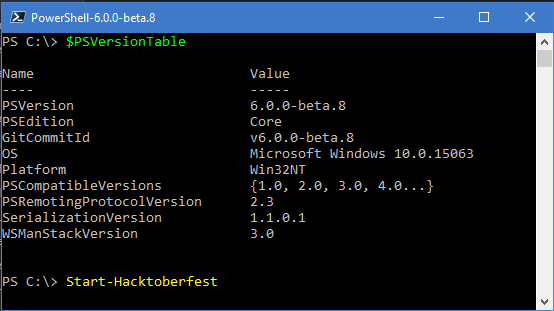
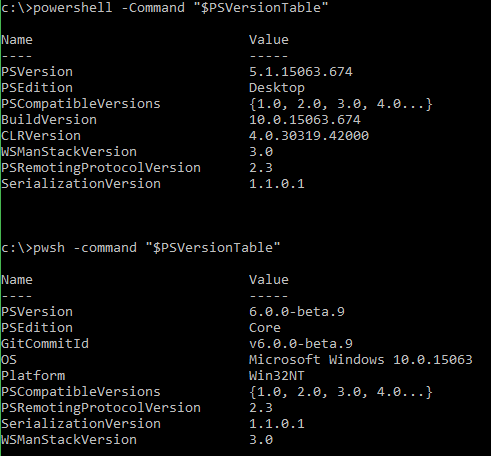
With the release of PowerShell Core 6.0.0-beta.9 the binary for PowerShell Core was renamed from powershell.exe and powershell on Windows and Linux/Unix/macOS respectively to pwsh.exe and pwsh. This major change has drained the pitchfork and torch emporiums of their stock as PowerShell users from all over the globe have taken to internet forums, twitter, slack, and the PowerShell repo to voice their opposition and disbelief in this change. The responses range from minor annoyance to expletive heavy diatribes.

It's clear that many PowerShell users are not happy with this change.

So why did the PowerShell Team decided to make such and unpopular change? There are several reasons the change was necessary and for why pwsh was chosen. I will attempt my best here to explain them all.

As you read, please keep in mind that I'm not a Microsoft employee nor am I a member of the PowerShell Team. I'm just a community contributor with collaborator access to the GitHub repo. I don't have any special insider knowledge, but I do follow the repo and PowerShell Core very closely. I am speaking to you as a fellow member of the community as someone with a decent insight into the project, not as an outright authority on all things PowerShell.

2017-10-22

New PowerShell Core Feature: Basic and OAuth Authentication for Invoke-WebRequest and Invoke-RestMethod

2017102201

Intro

PowerShell has always supported Basic authentication on Invoke-WebRequest and Invoke-RestMethod via the -Credential parameter. Those of you who have tried to use it on any modern APIs are probably scratching you head at what I just wrote. You probably know full well that the -Credential parameter is not sending Basic Authentication credentials when you expect it to. But it's true, Basic authentication has been there all along. The problem is that PowerShell will only send credentials if challenged.

This is a problem for accessing modern API's, especially for requesting OAuth Tokens from authentication endpoints. Modern APIs often do not issue 401 status codes with WWW-Authenticate headers. This results in the Web Cmdlets not issuing credentials to the remote server even though they were supplied. Modern API's expect you to present your credentials explicitly without being challenged first. This has resulted in a common frustration and feature request.

Additionally, the Web Cmdlets did not have any native support for OAuth bearer tokens. This means that all calls to APIs requiring OAuth tokens required passing an Authorization header. Since many OAuth grant flows require the client ID and client secret be sent as Basic authentication without a challenge, the entire OAuth process becomes a manual task.

I have run into this myself with the PSRAW and PSMSGraph projects. In both projects I have created wrapper functions around Invoke-WebRequest and Invoke-RestMethod that provide OAuth capabilities and handle the conversion of PSCredential to Basic Authentication. I have long wish this functionality was native to the cmdlets.

I'm pleased to announce that beginning with PowerShell Core 6.0.0-Beta.9, Invoke-WebRequest and Invoke-RestMethod  natively support explicit Basic and OAuth authentication.

If you want this functionality now, build the current master branch or pickup the nightly build. this was added in Pull Request #5052.

2017-10-21

-NoTypeInformation is Now Default For Export-Csv and ConvertTo-Csv in PowerShell Core

2017102101

Intro

On Monday morning I opened the PowerShell slack and started to catch up on the conversations I missed. The most recent conversation that morning was someone, yet again, asking how to get rid of the annoying first line in the output from Export-Csv. This is such a common question and an issue that trips up many PowerShell novices. I've probably answered this question several dozen times on /r/PowerShell. It also caused me grief when I was just starting out with the language.

This prompted me to ask myself and the slack channel "Does anyone actually use the default behavior of including the type information?" My gut and the few users online at the time told me no. So I created an Issue in the PowerShell repo then asked for feedback from /r/PowerShell, Twitter, and Slack. The result was 175 thumbs up, no thumbs down, and not a single person coming out in support of the default behavior.

Since the change is a breaking change, the issue went before the PowerShell Committee Wednesday and was ultimately approved. I quickly made my PR and early this morning the PR was merged to master. That's right: Starting with PowerShell 6.0.0-Beta.9 -NoTypeInformation will be the default behavior on Export-Csv and ConvertTo-Csv.

If you want this feature sooner, rather than later, you can either build the current master or pick up tomorrow's nightly build.

I use ConvertTo-Csv for all of my examples in this post for convenience. There is little difference between it and Export-Csv besides the fact that one puts a string in the output stream and the other in a file. They both share the same base class where this change was implemented so they both share the same new behavior.

2017-10-09

Hacktoberfest 2017 and PowerShell

hacktoberfest-2017-social-card-894a0558dba205f7142f3130c06823d72427a9d751d0f8c7db8a0079397178aa
Image source: https://hacktoberfest.digitalocean.com/

Intro

Hacktoberfest 2017 is upon us! Hacktoberfest is a month long celebration of open source software held by DigitalOcean in partnership with GitHub. The basis are thus:

  1. Go to https://hacktoberfest.digitalocean.com/
  2. Register with your GitHub account
  3. Make Pull requests in GitHub Repositories
  4. Make open source better
  5. Get a t-shirt (see site for details)

I posted about this recently on Reddit and I had many questions about what the bar is to become a contributor. I figured this was a fitting blog topic so I will cover it here.

2017100901

2017-09-27

New PowerShell Core Feature: Invoke-RestMethod -ResponseHeadersVariable

2017092701
Pictured: The new -ResponseHeadersVariable parameter in action

Intro

I wanted to share with you another new feature added to the PowerShell Core Invoke-RestMethod Cmdlet: The -ResponseHeadersVariable parameter.

This feature will be available starting with PowerShell Core v6.0.0-beta.8 and is available now in the nightly builds or if you build it yourself from master.

2017-09-24

Multipart/form-data Support for Invoke-WebRequest and Invoke-RestMethod in PowerShell Core

20170924_blog
Pictured: A packet capture of a current build of PowerShell Core submitting a multipart/form-data POST request from Invoke-WebRequest.

Intro

Over the past few months I have been donating a generous portion of my spare time to help improve the Web Cmdlets (Invoke-WebRequest and Invoke-RestMethod) in PowerShell Core. This is partly because I want and need certain functionality for both personal and work related projects. It is also because I have had some minor gripes about these Cmdlets for some time.

One common ask I have seen repeated in just about every PowerShell forum is multipart/form-data support. It seems like a reasonable thing to ask when there are many endpoints that will only work with a multipart/form-data submission. There is an open issue (#2112) on the PowerShell GitHub echoing the same request. It was brought to my attention and I decided to give it a serious look.

The result is that PowerShell Core now has partial multipart/form-data support in both Web Cmdlets. This change didn't make the cut for 6.0.0-beta.7 but it will be available starting in 6.0.0-beta.8 and is available now if you build it manually or grab the latest nightly build.

This blog will cover some of the challenges involved in supporting multipart/form-data, how to make use of this new feature, and about future plans for additional support.

Because typing multipart/form-data is annoying, I will be shortening it to just multipart. Please don't let this be mistaken for other multipart submission methods.

Also, I will be referring collectively to Invoke-WebRequest and Invoke-RestMethod as Web Cmdlets. In this case, there is no need to call out each command as they offer the same base functionality for multipart support.

2017-08-05

Porting PSRAW to PowerShell Core: Lessons Learned

psraw3

Intro

I took a significant break from commits to my PSRAW project. I have spent that time learning more about Open Source projects and Object Oriented Programming. Before I could move the project forward I had some architectural decisions to make and I don't have quite enough knowledge to make those decisions yet, but I'm getting there.

On July 14th, this blog from Microsoft dropped a bit of a bombshell on the PowerShell community by making it clear the path forward is in PowerShell Core.Windows PowerShell will still be developed/maintained, but the primary focus will be PowerShell Core. There was also a call to test out PowerShell Gallery modules. I put off the leap to Core for awhile, but it seemed that now was the time. My module is still young and flexible and I suspected that most of it would work on Core.

Shortly after that blog post, I  unleashed the Kraken and created a new branch in my local PSRAW repo named CoreRefactor, installed PowerShellCore 6.0.0-beta.4, switched VS Code to use PowerShell Core for the integrated terminal, and fired up my pester tests. Thus flowed a glorious sea of red failures and errors. This kicked off 2 weeks of refactoring. I wanted to share what I have learned from the experience.

At the time of this post PowerShellCore 6.0.0-beta.5 has just been released. I just completed my test against it. So everything in this post is at least relevant to that release.