2019-11-30

Teach Splating or Die!

Intro

This post is directed at mentors, trainers, documentation authors, and forum/chat helpers in the PowerShell community. This post is not a tutorial on splatting. I think the topic of splatting has been covered very well by many others.

I am imploring those of you in the PowerShell community to teach splatting early and often. By early, I mean it should be covered in the first few lessons of any 101 materials. By often, I mean that you should stop using backticks and consider using splats for any thing that uses 3 or more parameters.

I have had many discussions with many community leaders over the years and I'm a bit disappointed in the general aversion to teaching splatting as a part of introductory PowerShell. I have heard endless excuses that all sound like "my students are stupid" in my head. I'm sure many of you are making such arguments with the kindest of intentions, but I can't help but think you are insulting PowerShell novices.

I hope this blog post can assist in changing your mind and provide some guidance on how to approach teaching the subject early and often.

2019-05-18

Call For Presenters: The PowerShell Conference Book Volume 2

https://get-powershellblog.blogspot.com/2019/05/call-for-presenters-powershell.html

Calling All PowerShell and DevOps Authors, Presenters, Bloggers, and Enthusiasts!

The Call for Presenters (authors) is open for “The PowerShell Conference Book: Volume 2” until Friday May 31 at 11:00 PM EST. We are looking for one chapter per author on the topics of PowerShell and DevOps. All proceeds for the book will go to the PowerShell + DevOps Global Summit OnRamp Scholarships.
Those interested should submit a chapter abstract to the PSConfBook 2 CFP form at http://bit.ly/PSConfBook2CFP before the deadline. Authors may submit multiple abstracts, but only one abstract per author will be selected for inclusion in the book.

2018-07-14

On to New Endeavors: My New Role at LinkedIn


Logo-2CRev-128px-R

On May 18th I posted a tweet that made public my intent to find a new job. I’m happy to announce that search is over!

I have accepted an offer at LinkedIn with a tentative start date in the coming weeks.

I have waited to announce this publicly until I was sure there were no roadblocks. It has been a kind of open secret as I haven’t shied away from sharing it with anyone who asked directly.

This blog is to share that news and a little bit about the circumstances around the change.

2018-06-01

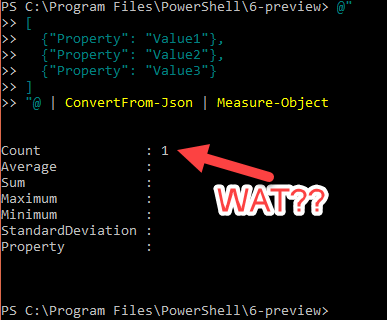
Why Invoke-RestMethod and ConvertFrom-Json Have Funky Pipelines

2018-05-31_16-46-39

Intro

At least once a week I am either directly asked to @-mentioned into a question about why Invoke-RestMethod and/or ConvertFrom-Json don’t play nice with the pipeline. I decided to put this into a blog post so I can just point people to it in the future.

Note that this blog entry was written while PowerShell 6.0.2 was current and 6.1.0 was on the way. This behavior may change in future versions.

2018-03-27

PowerShell Core 6.1 Web Cmdlets Roadmap

2018-01-25-01

Intro

Recently the PowerShell Team published their PowerShell Core 6.1 Roadmap. Several questions have come up about 6.1 plans for Invoke-WebRequest and Invoke-RestMethod. You may have noticed there is no mention of the Web Cmdlets in their roadmap. That is because the majority of the feature work for the cmdlets is being done by yours truly. As I am a community member and not a Microsoft employee, it would make sense that my work is not included in their blog. Anyway, I felt it was a good idea to share what I have in store for the next 6 months.

I should warn that this is more accurately called "Mark Kraus's PowerShell Core 6.1 Web Cmdlets Wish List" rather than a roadmap. I only have 2 features that are pretty much approved. The rest will depend on whether or not the changes actually get accepted. Also, I'm not part of any team working on this. It's just me and the issue queue back log of feature requests and bugs. If your company wants to hire me to work full time on the Web Cmdlets, then hit me up. Otherwise, this is all a side project for me and life happens. So please don't hold me to any deadlines! :)

2018-03-26

New Feature for 6.1: Resume Partial Downloads with Invoke-WebRequest and Invoke-RestMethod

2018-03-26_16-48-06

Intro

I’m excited to announce a new feature for Invoke-WebRequest and Invoke-RestMethod that will ship with PowerShell Core 6.1.0: Resume Downloads!

This is a feature that has been requested many times throughout the years and I’m please to say that it will be included in the next release of PowerShell Core. You should be able to preview the feature in 6.1.0-preview.2.

You can se the code changes in PR #6447.


2018-03-16

Peanut Butter and Chocolate: Azure Functions CI/CD Pipeline with AWS CodeCommit (Part 6 of 6)

2018-02-22-01

Part 6

In Part 5 we configured the AWS CodeCommit to trigger the AWS Lambda when a commit is made to the master branch of the repository. Effectively, our CI/CD pipeline is in place. To use it properly, we first need to add a cc2af.yml configuration file. After the configuration file is there, we can push out first Azure Function to our AWS CodeCommit repository and our AWS Lambda will be triggered and start a manual deployment on the Azure Functions Web App.

We will finish out the series in this post with demonstrating an automatic deployment from AWS CodeCommit to Azure Functions and triggering our Azure Function all from PowerShell.


Series Table of Contents


2018-03-10

Peanut Butter and Chocolate: Azure Functions CI/CD Pipeline with AWS CodeCommit (Part 5 of 6)

2018-02-22-01

Part 5

Sorry for the delay between part 4 and 5! I was at the Microsoft MVP Summit this past week and didn’t have time to devote towards updating. This series is nearing completion with just a few more parts to go.

In Part 4 we published the AWS Lambda and created the AWS KMS Key that will be used for encrypting and decrypting secrets. In Part 5 we will configured the AWS CodeCommit repository trigger to invoke the AWS Lambda and encrypt our secrets to store in in the cc2af.yml file.


Series Table of Contents


2018-03-03

Peanut Butter and Chocolate: Azure Functions CI/CD Pipeline with AWS CodeCommit (Part 4 of 6)

2018-02-22-015

Part 4

In Part 3 we successfully made the first glue between Azure Functions and AWS CodeCommit by making it possible to manually trigger the Azure Functions Web App to pull from the AWS CodeCommit repository. Obviously, a manual pull is not ideal. It is certainly not a Continuous Delivery.

In Part 4 we lay the groundwork for the 2nd piece of glue between Azure Functions and AWS CodeCommit. In order to automatically trigger a pull AWS CodeCommit from Azure Functions, we need an AWS Lambda. AWS Lambda and Azure Functions are somewhat analogous. They serve almost identical purposes in their respective clouds. We also need to create a KMS key that will be used for encrypting and decrypting secrets.


Series Table of Contents


2018-02-24

Peanut Butter and Chocolate: Azure Functions CI/CD Pipeline with AWS CodeCommit (Part 3 of 6)

2018-02-22-01

Part 3

In Part 2 we created the Azure Functions Web App and the AWS CodeCommit repository. In Part 3 we will make the initial deployment from AWS CodeCommit to Azure Functions. To do that we need to create an AWS IAM User Account, grant it access to the CodeCommit repository, generate HTTPS Git Credentials for the user, and configure the Azure Functions Web App external git deployment. By the end of this post, we will be able to manually deploy from AWS CodeCommit to Azure Functions on demand. This is a critical step to make automating the process possible.

This part will be short and sweet. I want to keep the relevant pieces together regardless of their length.


Series Table of Contents


2018-02-19

Peanut Butter and Chocolate: Azure Functions CI/CD Pipeline with AWS CodeCommit (Part 1 of 6)

2018-02-19-01
Source: 1981 Reese's Peanut Butter Cup Advertisement

Intro

This blog series will cover a Proof of Concept (POC) Project for creating a PowerShell-based Azure Functions CI/CD pipeline where the code is stored in AWS CodeCommit git-based version control system. The pipeline will be created and deployed using Windows PowerShell 5.1. Every step of the pipeline deployment process will be verified with Pester tests. The result of the project will be the ability to push changes to an AWS CodeCommit repository and those changes will be automatically deployed to Azure Functions.

This blog series is targeted at intermediate level PowerShell users and basic PowerShell concepts will not be described in detail. Also, this series will require some basic understanding of both Azure and AWS clouds and their PowerShell based management. Git and C# .NET Core are also leveraged in this project but they will not be covered in depth as this is a PowerShell-centric blog. Readers need only be familiar with basic concepts of git and C#.


Series Table of Contents


2018-01-25

PowerShell Core 6.1 Web Cmdlets Roadmap

2018-01-25-01

Intro

Recently the PowerShell Team published their PowerShell Core 6.1 Roadmap. Several questions have come up about 6.1 plans for Invoke-WebRequest and Invoke-RestMethod. You may have noticed there is no mention of the Web Cmdlets in their roadmap. That is because the majority of the feature work for the cmdlets is being done by yours truly. As I am a community member and not a Microsoft employee, it would make sense that my work is not included in their blog. Anyway, I felt it was a good idea to share what I have in store for the next 6 months.

I should warn that this is more accurately called "Mark Kraus's PowerShell Core 6.1 Web Cmdlets Wish List" rather than a roadmap. I only have 2 features that are pretty much approved. The rest will depend on whether or not the changes actually get accepted. Also, I'm not part of any team working on this. It's just me and the issue queue back log of feature requests and bugs. If your company wants to hire me to work full time on the Web Cmdlets, then hit me up. Otherwise, this is all a side project for me and life happens. So please don't hold me to any deadlines! :)

2017-12-24

PowerShell Core Web Cmdlets in Depth (Part 3)

2017122401

Part 3 Intro

In Part 1, I covered the primary changes in the actual code base of the PowerShell Core Web Cmdlets Invoke-RestMethod and Invoke-WebRequest and how those changes manifest themselves in the PowerShell user experience.

In Part 2, I covered outstanding issues as well missing and/or deprecated features.

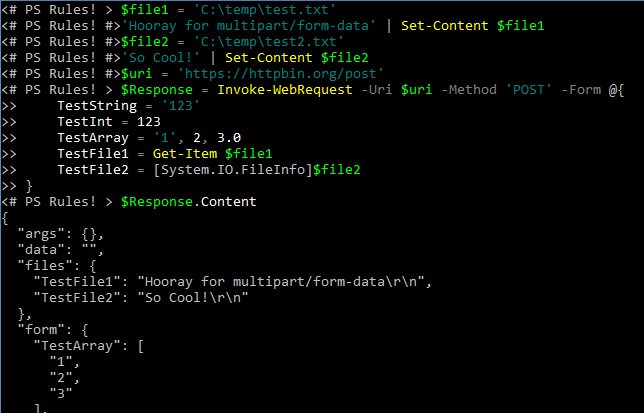
In Part 3, I will cover new features available in PowerShell Core 6.0.0 Invoke-RestMethod & Invoke-WebRequest. I will also cover future plans for the cmdlets.

If you have not read Part 1 and Part 2, please do so before reading Part 3. This blog series goes in depth and requires a great many words to do so. To save space I will not repeat some information and will assume the reader as read Part 1 and Part 2.

A quick bit of news: PowerShell Core v6.0.0-rc.2 was released. Unless any blocking issues are discovered, this will be the final RC release and the next release will be GA in January 2018.

2017-12-08

PowerShell Core Web Cmdlets in Depth (Part 2)

2017112801

Part 2 Intro

In Part 1, I covered the primary changes in the actual code base of the PowerShell Core Web Cmdlets Invoke-RestMethod and Invoke-WebRequest and how those changes manifest themselves in the PowerShell user experience.

In Part 2, I will cover outstanding issues as well missing and/or deprecated features. Some of this will be an extension of Part 1 because some of the feature reduction is due mostly to the switch to HttpClient. Any plans or fixes I mention in this section are tentative and may change when and/or if they are implemented.

If you have not read Part 1, please do so before reading Part 2. This blog series goes in depth and requires a great many words to do so. To save space I will not repeat some information and will assume the reader as read Part 1.

Also, this will be my first blog post as a new Microsoft MVP. I wanted to take a quick moment to thank the people who nominated me and the PowerShell community for your support in getting me here. It is a great honor and I am overjoyed! Thank you!

2017-11-27

PowerShell Core Web Cmdlets in Depth (Part 1)

2017112501

Intro

I recently spoke at the North Texas PC Users Group's PowerShell Special Interest Group on the topic of the Web Cmdlets in PowerShell Core. I spoke for full hour because there is just so much new and different about Invoke-RestMethod and Invoke-WebRequest between Windows PowerShell 5.1 and PowerShell Core 6.0.0. In fact, because I was limited to an hour, I couldn't go as in depth or cover as many things as I would have liked. This blog series will cover what I covered in that presentation and more. At this time I plan to have 3 parts with a possible 4th as an addendum should anything change between now and GA.

2017-11-06

PowerSMells: PowerShell Code Smells (Part 1.5)

2017110602

Intro

I am writing this next blog post in this series much sooner than I had anticipated. I wanted to do so in order to clarify a few things about PowerSMells and to address some of the negative feedback I have received. I will still include a PowerSMell, but this is mostly to address shortcomings in the Part 1 of the series.

Table of Contents for this series

2017-11-02

PowerSMells: PowerShell Code Smells (Part 1)

2017110601

Intro

A few weeks ago, someone in the slack channel asked what some of the Code Smells are in PowerShell. If you are not familiar with the term Code Smell, a simple definition is code that when you see it you know there will be issues just like when you smell something rotten know you will find something unpleasant. After some joking around the term PowerSMell was coined to describe a Code Smell particular to PowerShell.

This is the first in an ongoing series of Code Smells in PowerShell. Rather than make a massive single entry, I will try to cover only a few at a time and spread them out. Unlike my other series, this one wont be dumped all at once and I will work on this series between other blog posts. I may never truly be done with this series and I have no clue how many parts it will be. There are many Code Smells in PowerShell and it seems like I'm finding more each week.

One possible plan for the future is to begin a community PowerSMell project with PSScriptAnalyzer rules for linting these PowerSMells. I know there are several projects out there that already have some of these, but it would be nice to get them all together. If you are interested in working together on this let me know and we can begin coordinating.

Each PowerSMell will include a "The Smell" and a "The Source" section. The "The Smell" section will have a code example of the PowerSMell. The "The Source" section will have information about the problems that the smell hints to. Some PowerSMells are not always PowerSMells. When a certain PowerSMell has a non-smelly usage, it will include a "The Pleasant Aroma" section providing an example of the non-smelly usage.

Table of Contents for this series

2017-10-27

Why pwsh Was Chosen For PowerShell Core

2017102701

Intro

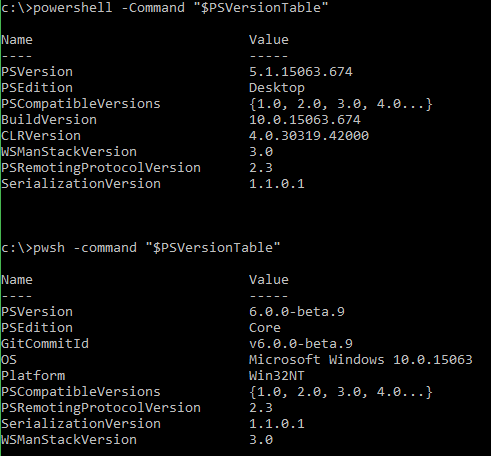
With the release of PowerShell Core 6.0.0-beta.9 the binary for PowerShell Core was renamed from powershell.exe and powershell on Windows and Linux/Unix/macOS respectively to pwsh.exe and pwsh. This major change has drained the pitchfork and torch emporiums of their stock as PowerShell users from all over the globe have taken to internet forums, twitter, slack, and the PowerShell repo to voice their opposition and disbelief in this change. The responses range from minor annoyance to expletive heavy diatribes.

It's clear that many PowerShell users are not happy with this change.

So why did the PowerShell Team decided to make such and unpopular change? There are several reasons the change was necessary and for why pwsh was chosen. I will attempt my best here to explain them all.

As you read, please keep in mind that I'm not a Microsoft employee nor am I a member of the PowerShell Team. I'm just a community contributor with collaborator access to the GitHub repo. I don't have any special insider knowledge, but I do follow the repo and PowerShell Core very closely. I am speaking to you as a fellow member of the community as someone with a decent insight into the project, not as an outright authority on all things PowerShell.

2017-10-22

New PowerShell Core Feature: Basic and OAuth Authentication for Invoke-WebRequest and Invoke-RestMethod

2017102201

Intro

PowerShell has always supported Basic authentication on Invoke-WebRequest and Invoke-RestMethod via the -Credential parameter. Those of you who have tried to use it on any modern APIs are probably scratching you head at what I just wrote. You probably know full well that the -Credential parameter is not sending Basic Authentication credentials when you expect it to. But it's true, Basic authentication has been there all along. The problem is that PowerShell will only send credentials if challenged.

This is a problem for accessing modern API's, especially for requesting OAuth Tokens from authentication endpoints. Modern APIs often do not issue 401 status codes with WWW-Authenticate headers. This results in the Web Cmdlets not issuing credentials to the remote server even though they were supplied. Modern API's expect you to present your credentials explicitly without being challenged first. This has resulted in a common frustration and feature request.

Additionally, the Web Cmdlets did not have any native support for OAuth bearer tokens. This means that all calls to APIs requiring OAuth tokens required passing an Authorization header. Since many OAuth grant flows require the client ID and client secret be sent as Basic authentication without a challenge, the entire OAuth process becomes a manual task.

I have run into this myself with the PSRAW and PSMSGraph projects. In both projects I have created wrapper functions around Invoke-WebRequest and Invoke-RestMethod that provide OAuth capabilities and handle the conversion of PSCredential to Basic Authentication. I have long wish this functionality was native to the cmdlets.

I'm pleased to announce that beginning with PowerShell Core 6.0.0-Beta.9, Invoke-WebRequest and Invoke-RestMethod  natively support explicit Basic and OAuth authentication.

If you want this functionality now, build the current master branch or pickup the nightly build. this was added in Pull Request #5052.